Section A-EDI User Guide IV - Communications-Sending & Receiving Files
Page 4 of 7
Release 1 (January 2008)
©Blue Cross Blue Shield of Georgia
Georgia - Medicare
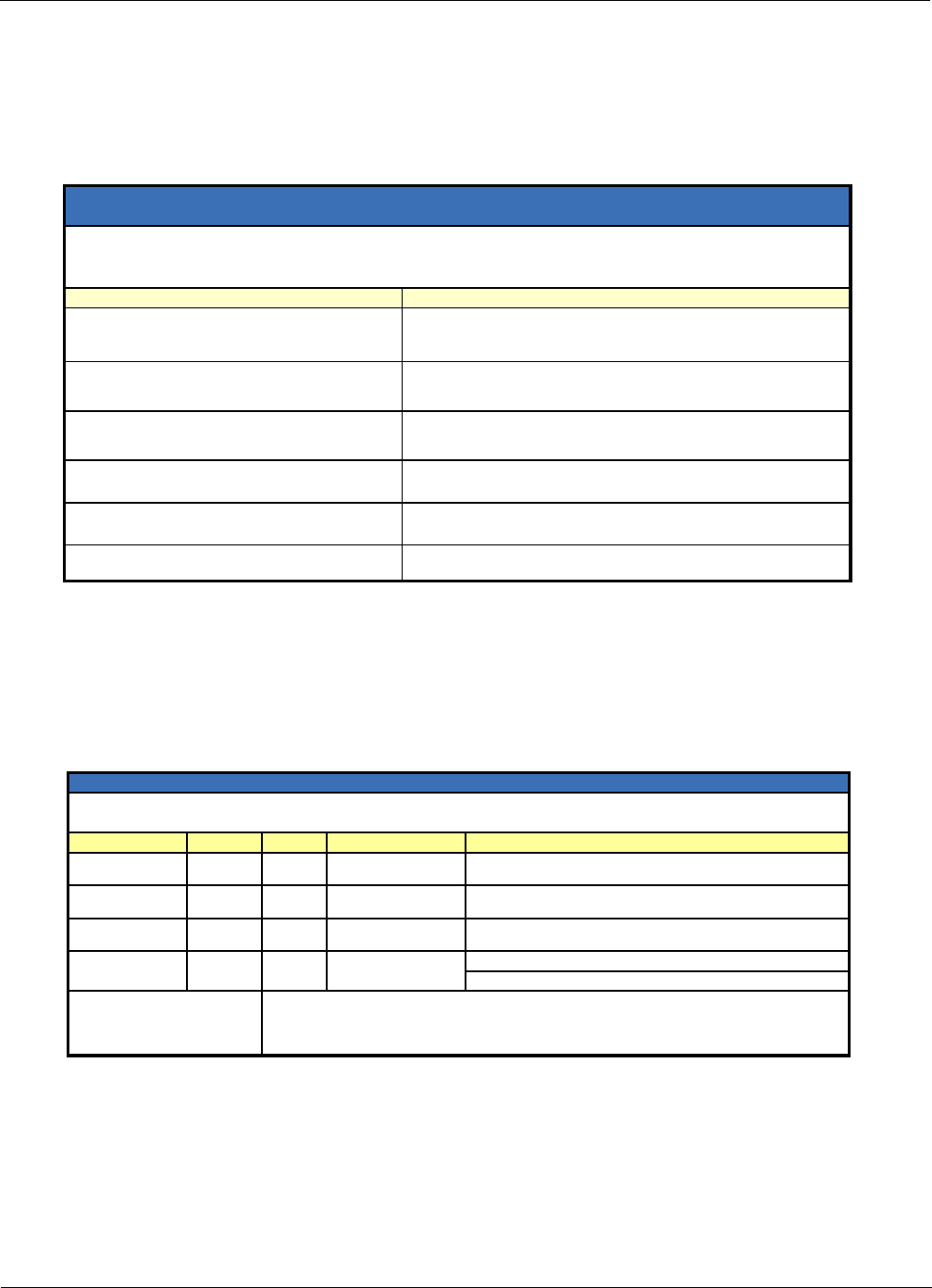
5. We will return one of the following values:
Y (089 decimal, 59 hex): Your Submitter Login Record was accepted.
Proceed to Step 6.
N (078 decimal, 4E hex): Your Submitter Login Record was not accepted.
A Transmission Acknowledgment will follow with an error message (see below).
The system automatically disconnects.
Error Messa
eEx
lanation
Invalid Submitter ID or pass-word
in the Submitter Login
The Submitter ID or password in the Submitter Login Record is not
valid. The values in these fields must match the Submitter ID and
password assigned by EDI Services.
Invalid assembly method in the
Submitter Login
The Assembly Method value in your Submitter Login Record is not
valid. The Assembly Method value must be NAT.
Invalid format name in the
Submitter Login
The Data Format value in your Submitter Login Record is not valid.
See the Submitter Login Record Specification on the next page for
Data Format values.
Invalid Transmission ID in the
Submitter Login
The Transmission ID value in your Submitter Login Record is not
valid.
The Transmission ID in the
Submitter Login is a duplicate
An earlier transmission included the same Submitter ID and
Transmission ID from your Submitter Login Record.
Host not responding
The Georgia Medicare computer system is not available. Please call
EDI Services at 888-883-2720, Option 3 to report this problem.
Submitter Login Not Accepted—Transmission Acknowledgment
with Error Messa
es
Transmission Acknowled
ment headin
:
ACKNOWLEDGMENT OF X SUBMITTER_ID.TRANS_ID ON yy-mm-dd AT hh:mm:ss
TRANSMISSION FAILED
6. Once your Submitter Login Record is accepted, pause for one second.
7. Send your transmission using either Xmodem or Zmodem.
8. After sending your transmission, pause for one second.
9. Log out: To log out, create and send the Submitter Logout Record in ASCII format. See the
chart below.
Field Name Position Length Value
Record
Indicator
17/SLROFF Submitter
lo
out
Submitter
Identifier
8 12 (12 Character
Submitter ID
Transmission
Identifier
20 8 (Transmission
Identifier
28
Description
/SLROFF indicates this event.
This is the same value as in the corresponding field from
the Submitter Lo
in Record.
This is the same value as in the corresponding field from
the Submitter Lo
in Record.
2 (Carriage Return
and Line Feed)
Sample Submitter Logout
Record
1 2
123456789012345678901234567
/SLROFFSUBMITTER_IDTRANS_ID
Carriage Return is 013 decimal, 0D hex.
Line Feed is 010 decimal, 0A hex.
End of File
Submitter Lo
out Record S
ecification
The Submitter Logout Record must not exceed 30 bytes, including the carriage return and line feed.
All fields are left justified and blank-filled. The blank filler is a space (032 decimal, 20 hex).

 (63 páginas)
 Manymanuals.com
 Manymanuals.de
 Manymanuals.fr
 Manymanuals.it
 Manymanuals.pl
 Manymanuals.cz
 Manymanuals.es
 Manymanuals-pt.com
Comentários a estes Manuais